A GUIDE TO FREE INTERNET ACCESS USING YOUR FREEDOM CLIENT
By ALIOGOR OBINNA
http://www.dejoepublication5.tk
Here are the new freedom settings WORKS FOR WINDOWS 7, windows XP and vista but this particular setting is for windows 7 and vista. I will send that of windows xp later
There is nothing much with the setup is still the same but u have to run a particular software before it will work Steps:
Download the new freedom software from www.your-freedom.de or click on this link below to download it
(http://www.your-freedom.net/ems-dist/yfinstall_20110512-01.exe).
To configure the freedom software Click on configure
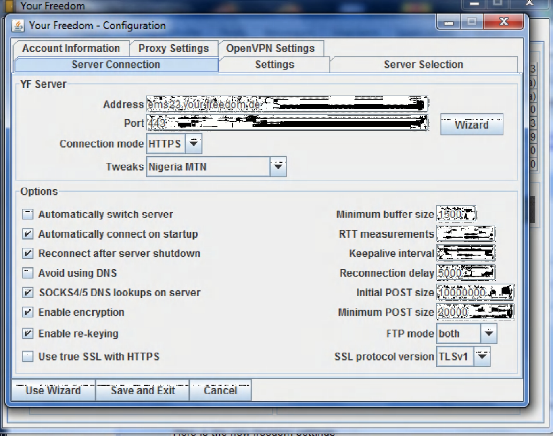
On the address use ems23.your-freedom.de or you can search for server
Port: 443
Connection mode: https
Tweak: MTN Nigeria
On the options where you will Mack or tick this boxes
Automatically switch server Automatically connect on start up Reconnect after server shut down Sucks4/5 DNS lookups on server Enable encryption Enable re-keying You will also see the following options Minimum buffer size 1500 Reconnection delay 5000 Initial post size: 10000000 Minimum post size: 20000 NOTE THE PICTURE BELOW EXPLAINS EVERY THING
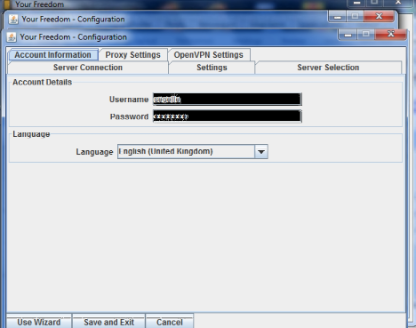
The next step is to click on account information here is where you will add a username and password
Example username: cecelle Password: cecelle
The picture below will explain it better
After the step of adding username and password, click on save and exit.
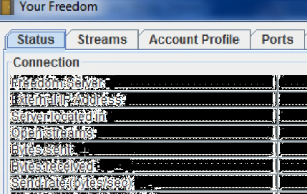
Note it will now show you this window below
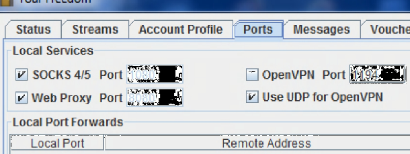
Next step: On this present window below click on port and tick or mack Suck4/5
Web proxy
Use UDP for open VPN Flatten traffic bursts
As shown below by the picture
Now click on status to return you back to the first page and then click exit. That is all on how to configure the freedom free browsing.
Insert your internet modem then locate the software called freedom TC is a zip file which I attached to your email, extract it then after you must have extracted it you will see various file simply locate the one called TCP optimizer
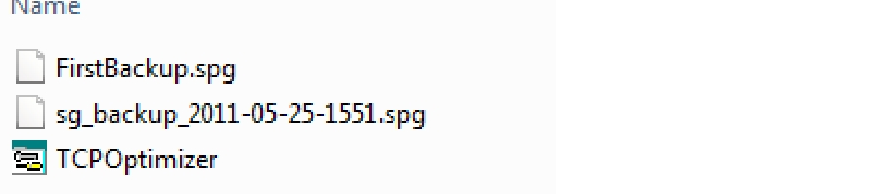
Right click on the TCPoptimzer and click on Run as administrator after which it will display a window for you make sure you increase the speed to the highest and click on apply changes as shown below
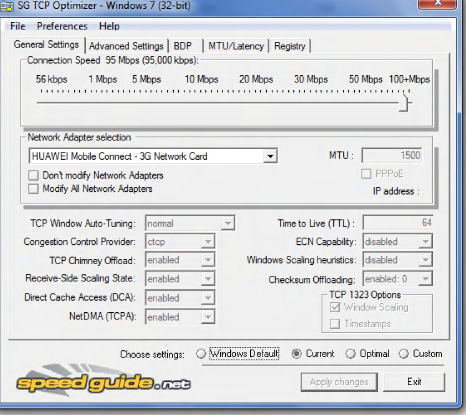
Then click exit That’s all……………
After all the configuration simply restart your computer
Then connect your internet modem once its connected simply open your freedom software and allow it to connect for you to start browsing
Note: if your freedom software is connect you will see this type of window below
Now once you start the connection on freedom, you will have access the internet free of charge. But the connection won’t be that fast because it’s a free version, if you need a superb high dimensional speed you will need a Basic Account i will upgrade it for you all you need to do is to contact me. | CLICK ON THE LINK BELOW MOBILE PHONE USERS TO GET EBOOK ON HOW TO CONFIGURE YOUR PHONES
CLICK ON THE LINK BELOW TO LEARN HOW TO CONFIGURE INDIAN WEB PROXY ON PC............
2GO USERS DO U KNOW U CAN MAKE $5 (DOLLAR) DAILLY USING 2GO ON PC OR MOBILE PHONE
details www.dejoepublication5.tk www.enugupracticalseminar.blogspot.com www.aocecelle.blogspot.com join us on FB http://www.facebook.com/group.php?gid=143068132381639&ref=ts |

